Saturday, August 18, 2012

H2 In-memory database


In-memory databases  are the databases which reside in main memory.These databases either partially or fully lack the durability property of ACID (atomicity, consistency,isolation and durability).
In-memory databases are used when either we want very quick performance  or in the cases where data used in application does not need to be durable. While developing the testcases of DAO layer, in memory database in embedded mode is preferred.  This provide quick access and full control of databases in the test.
In the arena of in-memory databases H2 has it significant presence.It can be included in the application using maven dependency and can be run in imbedded or standalone mode.
Maven Dependency
  <dependency>
     <groupId>com.h2database</groupId>
     <artifactId>h2</artifactId>
     <version>1.3.167</version>
  </dependency>
Bean configuration to start and stop the H2 database along with spring bean factory creation and destroy
<bean id = "org.h2.tools.Server"
            class="org.h2.tools.Server"
            factory-method="createTcpServer"
            init-method="start"
            destroy-method="stop">
    <constructor-arg value="-tcp,-tcpAllowOthers,true,-tcpPort,8043" />
</bean>
H2 default connection details
driver - org.h2.Driver
Hibernate Dialect -org.hibernate.dialect.H2Dialect
jdbc url -jdbc:h2:~/test
user name - sa
password -
Starting server from command line-

java -cp h2-1.3.167.jar org.h2.tools.Server
Shutting down server from command line –

java -cp h2-1.3.167.jar org.h2.tools.Server -tcpShutdown tcp://localhost:909

Basic setup to use H2 in unit testing -
To use H2 in unit test cases, we might want to extend H2DBEnabledTestCase class, which starts the H2 server in setup method  so that during test run database could be available and stops server in tearDown method.

import java.sql.SQLException;
import org.h2.tools.Server;
import junit.framework.TestCase;

public abstract class H2DBEnabledTestCase extends TestCase {

 private Server httpServer;

 @Override
 protected void setUp() throws SQLException {
  httpServer = Server.createTcpServer(
    new String[] { "-tcpPort", "8080", "-tcpAllowOthers" }).start();
 }

 @Override
 protected void tearDown() {
  if (httpServer != null && httpServer.isRunning(false)) {
   httpServer.stop();
  }
 }
}
H2 In-memory - The complete in-memory usage, keeps the complete database in main memory.  As soon as the database is shut down all the data gets lost.To use database in this way we neither need to explicitly start not stop it. Database will automatically become available as soon as you try to access it with specific URL.
In-memory jdbc url - jdbc:h2:mem:test;DB_CLOSE_DELAY=-1
Using the database in embedded mode Sample-
While including H2 in our application, we implemented facade for performing H2 related interactions and operations.

Sample use of H2 using above mentioned facade

Running application of above code can be downloaded from here . You will need java 6.0 and maven 3 to get the application running.

Kindly follow below mentioned steps to see it in execution –
  1. Download the application and extract it.
  2. Execute mvn eclipse:eclipse by traversing to the location of pom.xml
  3. Import the application in eclipse
  4. Run H2ServerTest.java  as Junit test.

Reference
http://www.h2database.com/html/tutorial.html
http://en.wikipedia.org/wiki/In-memory_database

Tuesday, June 19, 2012

Environment Troubleshooting commands

Remotely restart the windows machine -
runas /netonly /noprofile /user:<domain>\<administrator of server to reboot> "cmd"
shutdown -r -f -m \\<servername>

We can shutdown and log-off the computer remotely as well by tweaking some parameter in the above command

Testing SMTP server status via command line
telnet smtp.example.com 25
helo testing
First command will establish a connection with smtp server and bring the first response mentioning that smtp server is up. Second command will test that smtp server is responding to the commands.

Updating boot options - http://ask-leo.com/how_do_i_remove_boot_choices_that_i_no_longer_want.html
http://support.microsoft.com/kb/323427

Configuring start-up options -http://www.wintuts.com/System-Configuration-Utility

Dell Laptop drivers -
http://www.dell.com/support/drivers/us/en/19/DriversHome/NeedProductSelection

Dell Laptop Driver installation order -
http://support.dell.com/support/topics/global.aspx/support/kcs/document?c=us&cs=19&l=en&s=dhs&docid=DSN_1A0C0937D62A8739E0401E0A55174744&isLegacy=true

Reference-
runas
-http://www.microsoft.com/resources/documentation/windows/xp/all/proddocs/en-us/runas.mspx?mfr=true
shutdown- http://www.microsoft.com/resources/documentation/windows/xp/all/proddocs/en-us/shutdown.mspx?mfr=true
smtp test -  http://www.febooti.com/products/automation-workshop/tutorials/test-smtp-connection-send-test-email.html

Tuesday, June 12, 2012

Jasper subreport – Way to modularize jasper reports


We come across such a situation where a specific report section appears in multiple reports. Example - An external client focused company might have a contact information section in all of its reports. Company’s decision to change the format of contact information section might result in amending all the reports, involving huge manual effort.

Jasper reports provides a modularization mechanism where we can develop the working re-usable part of report independently and plug it in where ever needed.  This binding of reusable part to main report is runtime binding. So any changes in re-usable report would automatically get reflected wherever it has been used.

As an example to deal with above mentioned problem efficiently, we could have developed the contact information section as an independent report and plugged it in all other reports.

Jasper provides subreport tag to achieve modularity, where we can define how and where the included section should appear in the main report. We can pass the parent’s or derived connection, data sources or parameter map to be used for populating the included reports. 

Jasper subreport example - To demo the working of sub-reports, we will develop two reports called simpleSubreport.jrxml, simpleSubreport2.jrxml and use these modular components in simpleMaster.jrxml so that the complete report could be generated in a single shot-

simpleSubreport.jrxml
<?xml version="1.0" encoding="UTF-8"?>
<!DOCTYPE jasperReport PUBLIC "-//JasperReports//DTD Report Design//EN" "http://jasperreports.sourceforge.net/dtds/jasperreport.dtd">
<jasperReport name="SimpleSubreport" language="java" pageWidth="595" pageHeight="842" columnWidth="555" leftMargin="20" rightMargin="20" topMargin="30" bottomMargin="30">

 <field name="subTitle" class="java.lang.String"></field>
 
 <detail>
  <band height="100">
  <textField>
  <reportElement positionType="Float" x="55" y="14" width="75" height="41"/>
  <textElement/>
  <textFieldExpression class="java.lang.String"><![CDATA[$F{subTitle}]]></textFieldExpression>
  </textField>
  </band>
 </detail>
</jasperReport> 

simpleSubreport2.jrxml
<?xml version="1.0" encoding="UTF-8"?>
<!DOCTYPE jasperReport PUBLIC "-//JasperReports//DTD Report Design//EN" "http://jasperreports.sourceforge.net/dtds/jasperreport.dtd">
<jasperReport name="SimpleSubreport2" language="java" pageWidth="200" pageHeight="842" columnWidth="200" leftMargin="0" rightMargin="0" topMargin="0" bottomMargin="0">

 <field name="subTitle" class="java.lang.String"></field>
 
 <detail>
  <band height="100">
   <staticText>
   <reportElement positionType="Float" mode="Opaque" x="36" y="8" width="100" height="16" backcolor="#ff8000"/>
   <textElement/>
   </staticText>
   
   <textField>
   <reportElement positionType="Float" x="35" y="35" width="110" height="30"/>
   <textElement/>
   <textFieldExpression class="java.lang.String"><![CDATA[$F{subTitle}]]></textFieldExpression>
   </textField>
  </band>
 </detail>
</jasperReport>

simpleMaster.jrxml
<?xml version="1.0" encoding="UTF-8"?>
<jasperReport xmlns="http://jasperreports.sourceforge.net/jasperreports" xmlns:xsi="http://www.w3.org/2001/XMLSchema-instance" xsi:schemaLocation="http://jasperreports.sourceforge.net/jasperreports http://jasperreports.sourceforge.net/xsd/jasperreport.xsd" name="SimpleMaster" pageWidth="595" pageHeight="842" columnWidth="555" leftMargin="20" rightMargin="20" topMargin="30" bottomMargin="30">
 <parameter name="mainReportParameterMap" class="java.util.HashMap"/>

 <field name="master" class="java.lang.String"/>
 <field name="id" class="java.lang.String"/>
 <field name="id2" class="java.lang.String"/>
 <title>
  <band height="107" splitType="Stretch">
   <textField>
    <reportElement positionType="Float" x="79" y="8" width="167" height="30"/>
    <textElement/>
    <textFieldExpression class="java.lang.String"><![CDATA[$P{mainReportParameterMap}.get("title")]]></textFieldExpression>
   </textField>
   <textField>
    <reportElement positionType="Float" x="86" y="63" width="190" height="32"/>
    <textElement/>
    <textFieldExpression class="java.lang.String"><![CDATA[$F{master}]]></textFieldExpression>
   </textField>
  </band>
 </title>
 <detail>
  <band height="100" splitType="Stretch">
   <subreport>
    <reportElement positionType="Float" x="67" y="18" width="168" height="47"/>
    <subreportParameter name="id">
     <subreportParameterExpression><![CDATA[$P{mainReportParameterMap}.get($F{id})]]></subreportParameterExpression>
    </subreportParameter>
    <dataSourceExpression><![CDATA[$P{mainReportParameterMap}.get($F{id})]]></dataSourceExpression>
    <subreportExpression class="java.lang.String"><![CDATA["simpleSubreport.jasper"]]></subreportExpression>
   </subreport>
   <subreport>
    <reportElement positionType="Float" x="249" y="18" width="168" height="47"/>
    <subreportParameter name="id2">
     <subreportParameterExpression><![CDATA[$P{mainReportParameterMap}.get($F{id2})]]></subreportParameterExpression>
    </subreportParameter>
    <dataSourceExpression><![CDATA[$P{mainReportParameterMap}.get($F{id2})]]></dataSourceExpression>
    <subreportExpression class="java.lang.String"><![CDATA["simpleSubreport2.jasper"]]></subreportExpression>
   </subreport>
  </band>
 </detail>
 <pageFooter>
  <band height="15" splitType="Stretch">
   <textField>
    <reportElement x="0" y="0" width="520" height="15"/>
    <textElement textAlignment="Right"/>
    <textFieldExpression class="java.lang.Integer"><![CDATA[$V{PAGE_NUMBER}+"/"]]></textFieldExpression>
   </textField>
   <textField evaluationTime="Report">
    <reportElement x="521" y="0" width="14" height="15"/>
    <textElement textAlignment="Left"/>
    <textFieldExpression class="java.lang.Integer"><![CDATA[$V{PAGE_NUMBER}]]></textFieldExpression>
   </textField>
  </band>
 </pageFooter>
</jasperReport>

SubReportExample.java
package subreportexample;

import java.util.ArrayList;
import java.util.HashMap;
import java.util.List;
import java.util.Map;

import net.sf.jasperreports.engine.JRDataSource;
import net.sf.jasperreports.engine.JRException;
import net.sf.jasperreports.engine.JasperRunManager;
import net.sf.jasperreports.engine.data.JRMapCollectionDataSource;
import utility.JasperUtility;

@SuppressWarnings("rawtypes")
public class SubReportExample {

 static String jrxmlFileLocation = "src\\main\\resources\\subreportexample\\";
 static String jasperFileLocation = "target\\classes\\subreportexample\\";
 String outputPDFFile = "target\\classes\\subreportexample\\SubReportFile.pdf";;
 final int firstDatasourceNumber = 1;
 final int secondDatasourceNumber = 2;

 /**
  * @throws JRException
  */
 @SuppressWarnings("unchecked")
 private void generateReport() throws JRException {

  List simpleSubMasterList = getMapArrayListForReport(firstDatasourceNumber);
  JRMapCollectionDataSource firstReportDataSource = new JRMapCollectionDataSource(
    simpleSubMasterList);

  simpleSubMasterList = getMapArrayListForReport(secondDatasourceNumber);
  JRMapCollectionDataSource secondReportDataSource = new JRMapCollectionDataSource(
    simpleSubMasterList);

  HashMap mainReportParameterMap = new HashMap();
  mainReportParameterMap.put("title", "Title of master report");
  mainReportParameterMap.put("subDS", firstReportDataSource);
  mainReportParameterMap.put("subDS2", secondReportDataSource);

  Map mainReportDSElementMap = new HashMap();
  mainReportDSElementMap.put("master",
    "This portion is from master report");
  mainReportDSElementMap.put("id", "subDS");
  mainReportDSElementMap.put("id2", "subDS2");

  List simpleMasterList = new ArrayList();
  simpleMasterList.add(mainReportDSElementMap);
  JRDataSource simpleDS = new JRMapCollectionDataSource(simpleMasterList);

  Map parameters = new HashMap();
  parameters.put("mainReportParameterMap", mainReportParameterMap);

  JasperRunManager.runReportToPdfFile(jasperFileLocation
    + "simpleMaster.jasper", outputPDFFile, parameters, simpleDS);
 }

 /**
  * @param firstDatasourceNumber
  * @return
  */
 @SuppressWarnings("unchecked")
 private List getMapArrayListForReport(int firstDatasourceNumber) {
  List simpleSubMasterList = new ArrayList();

  for (int i = 0; i < 30; i++) {
   Map simpleSubMasterMap = new HashMap();
   simpleSubMasterMap.put("subTitle", "This is subtitile no " + i
     + " of data source no " + firstDatasourceNumber);
   simpleSubMasterList.add(simpleSubMasterMap);
  }
  return simpleSubMasterList;
 }

 public static void main(String[] args) throws JRException {
  compileJrxmlFiles();
  new SubReportExample().generateReport();
  System.out.println("done");
 }

 private static void compileJrxmlFiles() throws JRException {
  JasperUtility.compileAndGenerateJasperFile(jrxmlFileLocation,
    jasperFileLocation, "simpleMaster", "simpleSubreport",
    "simpleSubreport2");
 }
}

Sample Project -
Sample project can be downloaded from here

 You will need maven-3 along with java 5 or higher version, setup in your machine to run the sample.
Kindly follow the below mentioned steps to run the sample and get the report -
  1. Download & unzip the project
  2. Run- mvn clean eclipse:eclipse install in project's home directory
  3. Import the application in eclipse
  4. Execute SubReportExample.java file
  5. Sample pdf will be generated at target\\classes\\subreportexample\\SubReportFile.pdf location.
References
http://salilstock.blogspot.in/2012/05/jasperreport-open-source-java-reporting.html
http://salilstock.blogspot.in/2012/05/including-page-number-and-page-count-in.html

Monday, May 28, 2012

Defining project relationships in maven


Maven provides three ways to define project relationships

Dependency – Dependency relationships are useful when one wishes to use some API in the project/framework. Since the advent of maven 2.x dependency relation ship has got much stronger & usable, where one just needs to declare the project dependency and maven itself take care of transitive dependency.  
To define dependency, one needs to mention the repository, if jar does not exist in maven’s default repository and add dependency in pom.xml. One can define the repository in settings.xml as well but that would reduce the projects portability.

The example of declaration to include javaee in your project is as mentioned below –
 <repositories>
  <repository>
   <id>Java.Net</id>
   <url>http://download.java.net/maven/2/</url>
  </repository>
 </repositories>

 <dependencies>
  <dependency>
   <groupId>javax</groupId>
   <artifactId>javaee-api</artifactId>
   <version>6.0</version>
  </dependency>
 </dependencies>

Inheritance – Inheritance as the name suggests let the child projects inherit the parent’s elements. One can use inheritance in multi module project by making a parent project, extracting the common elements of module’s POM and putting them in parent project’s POM. After declaring the parent relationship in child’s POM the elements automatically become available in child project.

Maven provide the inheritance of following elements –
  • dependencies
  • developers and contributors
  • plugin lists
  • reports lists
  • plugin executions with matching ids
  • plugin configuration
Example of parent declaration in maven 3.0 project is as mentioned below -

    <parent>
  <groupId>org.apache.maven</groupId>
  <artifactId>maven-parent</artifactId>
  <version>21</version>
  <relativePath>../pom/maven/pom.xml</relativePath>
  </parent>
Note – In maven all the POMs by default inherit the super POM, which defines the default maven project structure,  default life-cycle and plugin for default life cycle activities

Aggregation – Aggregation is used in muti-module project; where one wants to centralize the build process of all the modules. He/She needs to create a aggregator project and declare all the module’s in it’s POM. During the build phase of aggregator project all the modules are built. The ordering of module does not matter. Maven always builds the dependency first and then project.

Example of aggregation in maven project is as mentioned below –
  <modules>
  <module>maven-plugin-api</module>
  <module>maven-model</module>
  <module>maven-model-builder</module>
  <module>maven-core</module>
  <module>maven-settings</module>
  <module>maven-settings-builder</module>
  <module>maven-artifact</module>
  <module>maven-aether-provider</module>
  <module>maven-repository-metadata</module>
  <module>maven-embedder</module>
  <module>maven-compat</module>
  <module>apache-maven</module>
  </modules>
References -
Super Pom -
http://maven.apache.org/guides/introduction/introduction-to-the-pom.html
POM Reference - http://maven.apache.org/pom.html
Maven 3.0 project pom - http://svn.apache.org/viewvc/maven/maven-3/trunk/pom.xml?view=markup

Saturday, May 19, 2012

Response compression in Apache (using mod_deflate)


In any web application's popularity it's performance plays a prominent role. To make sure that application has optimal performance, developer need to review the application, environment and target customer’s environment. Some solutions, which give performance boost for high bandwidth client, might fall flat for low bandwidth clients. If we are tuning our application for low bandwidth clients we need to minimize the network overhead in our application.

Among multiple ways to minimize the network overhead, response compression is one of the solutions. As response compression is not part of application’s business logic, we should not mix it with our application code.

With the advent of multi-feature servers, response compression can be configured in the servers now. Even browser supports the compressed response. The complete life cycle is managed in below steps –
  1. Client (i.e. browser) sends the request to the Server
  2. Sever passes the request to the application
  3. Application generates the response and provide it to server to be sent to the client (i.e. browser)
  4. Server checks whether the compression option of the specific mime type, being sent as response, has been configured.
  5. If yes, server compresses the data, add compression info into header and sends the compressed response to client.
  6. Client (i.e. browser) checks the header and knows that response it compressed, it decompresses it and renders/processes
 Apache web server provides an extension called mod_deflate to be used to achieve response compression of  specific type of mime object. To use it, we need to add below mentioned configuration in httpd.conf configuration file.

LoadModule deflate_module modules/mod_deflate.so

<Location />
   AddOutputFilterByType DEFLATE text/html text/plain text/xml application/javascript text/css
</Location>

Effectiveness – We achieve almost 75% compression, using mod_deflate. Below screenshots depict sample of compression level achieved using mod_deflate.

Response size before compression

Response size after compression - 

Places to avoid mod_deflate –
  1. Once should not use mod_deflate to compress images or videos.
  2. In high bandwidth environment, mod_deflate’s effect on performance should be checked before sending it to production. Because overhead of compression and de-compression activity (few milliseconds) might surpass the benefit of data transfer reduction. 
References -
Apache mod deflate - http://httpd.apache.org/docs/2.2/mod/mod_deflate.html

Thursday, May 17, 2012

Implementing Factory Design pattern using Type Safe Enum


When we have multiple similar type of objects and want to make such object creation process completely cohesive, we use factory design pattern.

There are two ways to implement it –
1.      Implementing the singleton factory class and then creating a method to generate the objects.
2.      Using type safe enum (in java) to create factory.

Here we will focus on second way of implementing factory design pattern.  There are following reasons to choose enum for factory implementation –
1.      Enum are inherently singleton.
2.      Enum can implement interface, which becomes the parent of each enum element.
3.      Enum provides easy way of avoiding code duplication by letting us develop common feature with same implementation in enum body and feature with different implementation in enum element body.
4.      Enum provides singleton implementation of each enum element.

Steps to implementing factory using enum–
Factory generates the similar type of objects. In other words all the objects generated by factory belongs to same super class/interface.

We can follow the below mentioned steps to generate factory -
1.      Develop an interface and declare the common features of the sub classes to it.
2.      Develop an enum, implementing the interface.
3.      Declare the enum properties adding specific implementation inside the body of enum element and common implementations inside enum.

Sample implementation –
Interface –
public interface Operation {
    double evaluate(double a, double b);

    String operationName();
}
Enum as factory –
public enum NumberOperation implements Operation {
    ADDIION("Addition") {
        public double evaluate(double a, double b) {
            return a + b;
        }
    },
    SUBSTRACTION("Substraction") {
        public double evaluate(double a, double b) {
            return a - b;
        }
    },
    MULTIPLICATION("Multiplication") {
        public double evaluate(double a, double b) {
            return a * b;
        }
    },
    DIVISION("Division") {
        public double evaluate(double a, double b) {
            if (b == 0)
                throw new IllegalArgumentException(String.format(
                        "%s is not supported as denominator for division", b));
            return a / b;
        }
    };

    private String operationName;

    private NumberOperation(String operationName) {
        this.operationName = operationName;
    }

    public String operationName() {
        return operationName;
    }
}
Limitations -
Enum can implement interface but can not extend abstract class. The workaround for it is to implement interface and develop common code in enum body. As we did in above mentioned example

Sample project –
The sample project with the above factory implementation can be downloaded from here.

In this project, we have developed a small requirement where client requirement was to provide implementation of addition, subtraction, multiplication and division.

During this design of sample program, we used TDD considering tests as our client and used below design patterns and design principals –
  1. Factory Design pattern
  2. Facade Design pattern
  3. Bridge Design pattern
  4. Strategy design pattern
  5. Singleton design patter (inherent in enum)
  6. Dependency inversion
  7. Cohesion
  8. TDD
To execute the project you will need maven 3 & java 5.0 or above installed in your application.  To check the program in execution use the following steps –
1-     Download and extract the zip
2-     Run mvn clean eclipse:eclipse test-compile
3-     Import the project into eclipse and execute NumberOperationSpec as JUnit.

Friday, May 11, 2012

Including page number and page count in JasperReports Footer


Multiple times, we come across such a requirement, where we need to display page number and page count info in report's footer.These footers help the viewer in identifying the proper sequence of pages after the report is printed.

The challenge in such scenario is to identify the total page count even in the first sheet of the report.

JasperReports provide us fine grained control on the time, when a specific text filed expression should be evaluated.Possible evaluation timings are Now, Report,Group, Band,Page,Column,Auto. We can use JasperReport's build in system variable "PAGE_NUMBER" to get the page number during the evaluation time.

To add page number/total page count info in report footer, we divide the complete info into two below sections on the basis of evaluation time.
  1. The info,which should be evaluated and printed as soon as the control reaches (Page Number and "/")
  2. The info which should be evaluated and printed when the complete report is created (Total Page Count)
Then we add two text  field in the report footer mentioning the evaluation time of second text field as Reort. Fist section will print the page number at default evaluation time (ie now).

Sample code- 
 
 <pageFooter>
    <band height="15">
      <textField>
        <reportElement x="0" y="0" width="520" height="15"/>
        <textElement textAlignment="Right"/>
        <textFieldExpression class="java.lang.Integer"><![CDATA[$V{PAGE_NUMBER}+"/"]]></textFieldExpression>
      </textField>
      <textField evaluationTime="Report">
        <reportElement x="521" y="0" width="14" height="15"/>
        <textElement textAlignment="Left"/>
        <textFieldExpression class="java.lang.Integer"><![CDATA[$V{PAGE_NUMBER}]]></textFieldExpression>
      </textField>
    </band>
  </pageFooter>
Note - While using the above code make sure that your footer does not get out of the max report height.

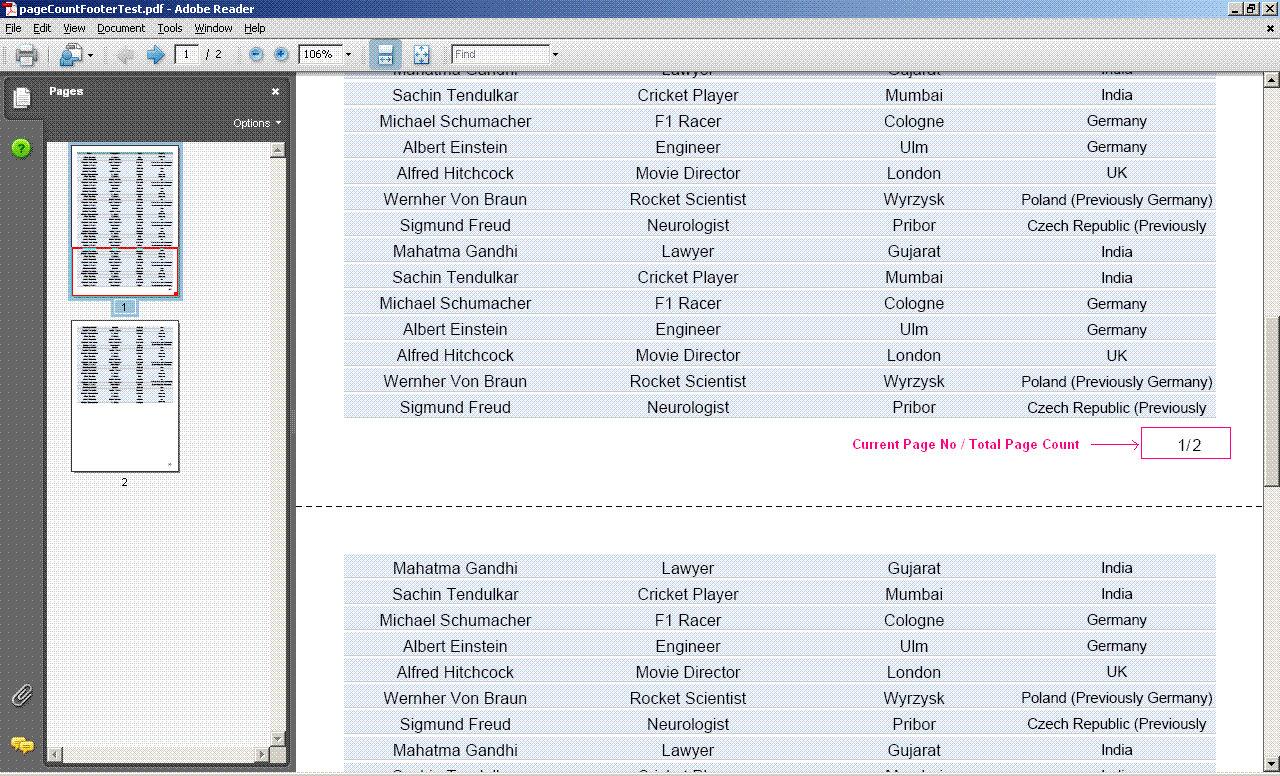
Sample view -

Sample Project -
Sample project can be downloaded from here

You will need maven-3 along with java 5 or higher version, setup in your machine to run the sample.
Kindly follow the below mentioned steps to run the sample and get the report -
  1. Download & unzip the project
  2. Run- mvn clean eclipse:eclipse install in project's home directory
  3. Import the application in eclipse
  4. Execute PageCountFooterTest java file
  5. Sample pdf will be generated at target\\classes\\pageCountFooterTest.pdf location.
References - 
http://salilstock.blogspot.in/2012/05/jasperreport-open-source-java-reporting.html